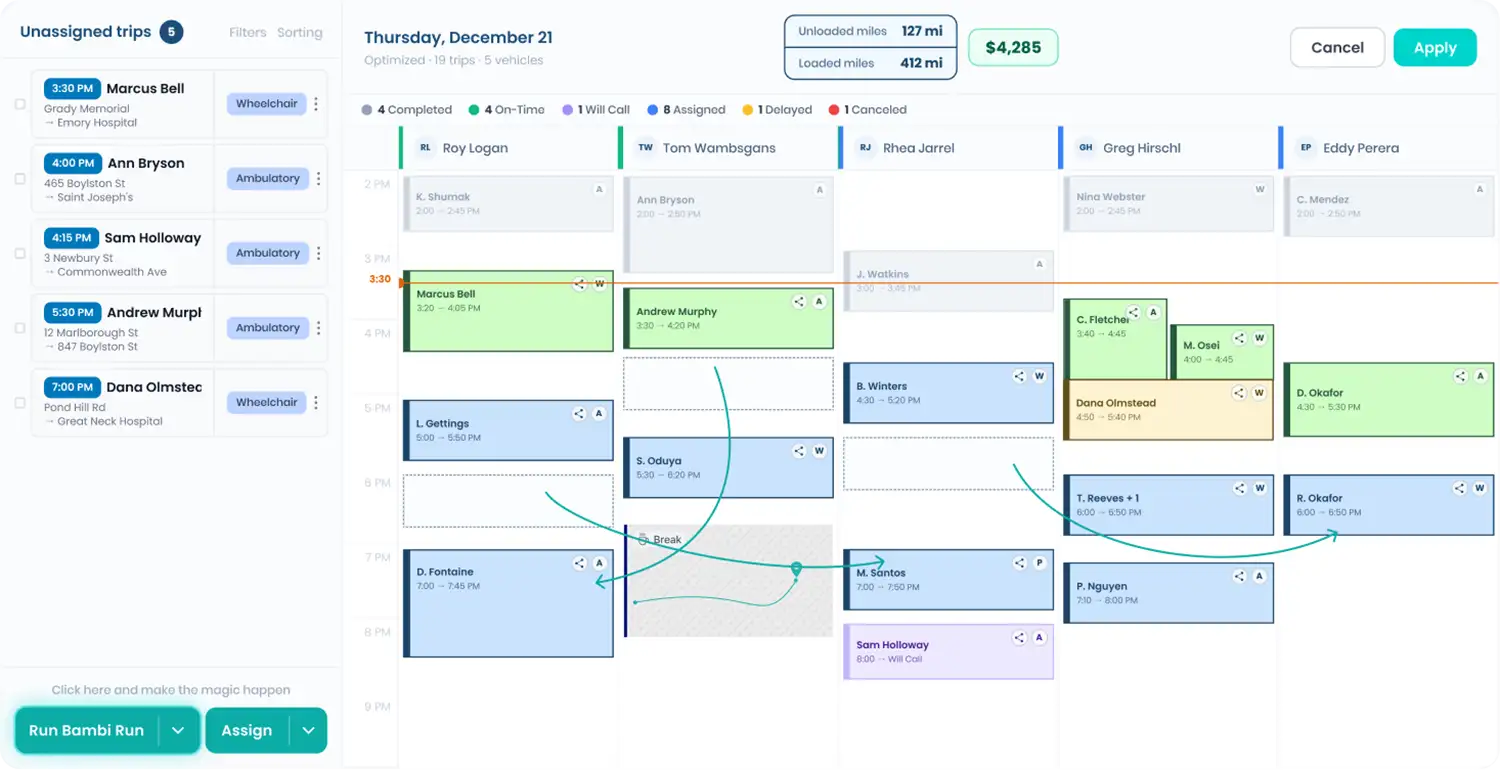
Zyvra Mobility has cracked the code on reliable medical transportation in one of Texas's most congested cities by partnering with Bambi NEMT software. By automating complex routing and dispatching, they have turned the logistical nightmare of Austin traffic into a predictable, scalable operation that hospital systems trust.
For NEMT providers, the equation is simple: missed appointments mean lost revenue and compromised patient health. Zyvra uses Bambi's AI-driven platform to ensure patients arrive on time, every time, regardless of what I-35 looks like.
Operating a Non-Emergency Medical Transportation (NEMT) business in Austin presents unique hurdles. The city is home to major healthcare networks like St. David’s Medical Center and Ascension Seton, but it is also famous for gridlock on key arteries like MoPac and I-35.
For a provider like Zyvra Mobility, manual routing is impossible. A ten-mile trip can take 20 minutes or an hour depending on the time of day. Relying on static schedules leads to late pickups, frustrated care coordinators, and driver burnout.
"Getting to a doctor's appointment in Austin can be challenging. Heavy traffic... and the stress of driving can make the journey difficult."
— Zyvra Mobility
Founded by Wesley Burris and a team with decades of experience in long-term care, Zyvra Mobility was built to fill the reliability gap in Travis County. Their mission is inspired by the concept of a "higher standard of care," ensuring that transportation is not just a ride, but a dignified extension of healthcare.
They serve a diverse client base, from seniors needing dialysis transport to patients requiring stretcher services for hospital discharges. To deliver this "white-glove" service at scale, they needed technology that matched their ambition.
Zyvra Mobility explicitly lists Bambi NEMT as their "Revolutionary NEMT Technology." Here is how the software supports their daily operations.
Bambi's "Run Bambi Run" feature handles the heavy lifting of scheduling. Instead of a dispatcher manually puzzling out which driver is closest to a pickup, the software analyzes fleet locations and traffic data in real-time. It automatically suggests the most efficient route, allowing Zyvra to fit more trips into a day without overworking drivers.
Drivers use the Bambi app to receive trip updates instantly. There is no need for constant radio chatter or phone calls to check status.
Cash flow is the lifeblood of any NEMT business. Bambi automates the billing process, generating invoices and processing credit cards without external tools. For Zyvra, this means less time chasing payments and more time focusing on patient care.
The shift from manual or legacy systems to AI-powered software changes the operational landscape entirely.

Zyvra Mobility demonstrates that success in modern NEMT is not just about having vehicles; it is about having the right intelligence behind them.
By adopting Bambi, they have future-proofed their business. They can handle last-minute discharge requests from St. David's or urgent dialysis appointments without disrupting their entire schedule. For other NEMT providers, Zyvra serves as a clear proof of concept: automation is the key to reliability.
Automated dispatching and routing turn transportation from a commodity into a reliable service that healthcare facilities aggressively seek out. Zyvra has positioned itself as that reliable partner in Austin.
Bambi NEMT Software: FULL DAY Real-Time Scheduling & Dynamic Dispatch Demo
This video provides a practical look at the exact software features Zyvra uses to manage their daily dispatching and routing challenges.

Idling wastes fuel, damages engines, pollutes the air, and risks costly fines. For Non-Emergency Medical Transportation (NEMT) providers, managing idle time is critical to cutting costs, staying compliant with laws, and ensuring passenger comfort. Here's what you need to know:
Balancing compliance, cost control, and passenger comfort is key. Smart policies and technology can save money, reduce emissions, and avoid fines.
NEMT Idle Reduction: Costs, Regulations, and Savings by State
Three key federal agencies play a role in shaping idle reduction policies for Non-Emergency Medical Transportation (NEMT) operations: the Environmental Protection Agency (EPA), the Federal Motor Carrier Safety Administration (FMCSA), and the Department of Energy (DOE). Each agency contributes through specific regulations and programs. The EPA sets national emissions standards and provides anti-idling guidance that states and cities often adopt. FMCSA focuses on commercial vehicle safety and hours-of-service rules, which determine when and where drivers can rest or wait, as well as how auxiliary power units (APUs) fit into compliance. Meanwhile, the DOE supports research on the fuel and emissions impact of idling and offers tools and resources through its Clean Cities coalitions to help fleets adopt idle-reduction technologies. Together, these programs establish compliance standards, influence state regulations, and spotlight technologies that cut fuel costs and reduce regulatory risks. Below, each agency's contributions are explored in detail.
The EPA takes a voluntary approach to idle reduction, rather than enforcing a single nationwide mandate. It publishes model policies that typically limit idling to 3–5 minutes, with exceptions for extreme weather, safety concerns, maintenance, and certain medical needs. These guidelines help NEMT providers create internal policies that distinguish between "necessary" and "unnecessary" idling. For example, they may require drivers to turn off engines after a set period when it’s safe or pre-condition vehicles before pickups. The EPA also runs the SmartWay Transport Partnership, which encourages fleets to adopt strategies that reduce fuel use and emissions. This program provides efficiency benchmarks and recognizes companies that meet its standards. FMCSA regulations further complement these efforts by addressing driver rest and idle reduction.
FMCSA's hours-of-service (HOS) rules set limits on the daily and weekly driving hours for commercial drivers and require specific rest breaks. While many NEMT vehicles and drivers fall under state-specific passenger-carrier rules rather than interstate commercial driver’s license (CDL) requirements, the same safety principles apply. Managing downtime between trips is essential to avoid unnecessary engine idling. FMCSA also recognizes the use of auxiliary power units (APUs), which allow drivers to run air conditioning, heating, or onboard equipment during mandatory rest periods without idling the main engine. To support adoption, FMCSA provides weight exemptions for vehicles equipped with idle reduction technology. For NEMT providers, this means they can plan safe breaks and maintain comfort without relying on prolonged idling.

DOE research highlights the significant costs of idling. For instance, idling for just one hour burns approximately 0.25–1 gallon of fuel per vehicle, with emissions comparable to driving 15–50 miles. Nationwide, truck idling wastes about 5.5 billion gallons of fuel annually. APUs can help reduce particulate matter and nitrogen oxide emissions by 70–90% during rest periods and save up to $1,800 per truck annually in fuel costs for long-haul operations. The DOE’s Clean Cities program, a network of local coalitions, provides resources to help fleets adopt idle-reduction technologies. These include technical assistance, case studies showcasing fuel savings, connections to funding opportunities, and training for fleet managers. For NEMT operators, Clean Cities offers practical tools to assess idling patterns, choose suitable technologies, and access financial support.
State and local governments, building on federal guidelines, have established their own idling limits and exemptions, often tailored to local needs. Most states impose limits of 3–5 minutes, but the specifics of enforcement and penalties can vary significantly. Knowing these rules - and the exemptions for medical transport - helps operators stay compliant while ensuring passenger safety and comfort. Below, we’ll explore typical state regulations, stricter examples, and city-specific rules.
Most state anti-idling laws restrict commercial vehicle idling to 3–5 minutes, with exceptions for essential operations like maintaining medical equipment or ensuring passenger comfort in extreme weather. In colder conditions - typically below 40°F - idling for engine warm-up is often allowed, as is idling necessary for powering medical devices during transport. Operators are advised to document these exemptions in trip logs, as fines for violations can range from $250 to $2,000.
Some states take a more aggressive stance on idling. California’s Air Resources Board enforces a statewide 5-minute limit under its Diesel-Fueled Commercial Motor Vehicle Idling Regulation. Vehicles from model year 2008 or newer must have automatic shutoff systems that activate after 5 minutes. Exemptions exist for situations like aiding disabled passengers or powering medical devices. For low-use vehicles - those operating under 1,000 miles or 100 hours annually - independent verification is required for compliance credits.
New York imposes even stricter limits in certain areas, with idling capped at just 1 minute in some zones. Penalties start at $350, but idling for medical needs is allowed for up to 5 minutes. Meanwhile, New Jersey sets a general 3-minute limit, but environmental zones reduce this to 1 minute, with fines reaching as high as $3,000. Non-Emergency Medical Transport (NEMT) providers in these states benefit from exemptions for medical necessities but should ensure proper documentation to avoid penalties.
At the city level, regulations often go beyond state mandates, especially in high-traffic or pollution-prone areas. For example, New York City enforces a 3-minute idling limit, with fines ranging from $350 to $2,000. Los Angeles applies a similar 3-minute cap in sensitive zones, while Chicago generally allows idling for up to 10 minutes but limits it to 3 minutes in residential areas.
Hospital districts, where vehicle activity is high, often implement zero-idle policies. These are enforced through patrols, automated cameras, and complaint-driven ticketing, with fines sometimes doubling in areas with severe pollution. Operators near medical centers can benefit from using GPS tracking and route optimization tools to document minimal idling and ensure compliance with local rules. Pre-trip planning, combined with driver training on weather protocols and medical needs, can further reduce the risk of fines while maintaining efficient and passenger-friendly operations. Adapting to these local requirements helps NEMT providers strike a balance between meeting regulations and keeping passengers comfortable.
State and federal regulations are just the beginning when it comes to the challenges faced by Non-Emergency Medical Transportation (NEMT) providers. Operational costs and penalties tied to idle reduction rules add another layer of complexity. For example, a NEMT van idling at a rate of 0.8 gallons per hour could rack up an additional $2,000–$5,000 annually in fuel costs. This estimate is based on 1–2 hours of daily idling over 250 operating days, with diesel priced at roughly $3.50 per gallon. Beyond fuel, idling also accelerates engine wear, leading to issues like carbon buildup and oil contamination. This can increase maintenance expenses by 10–20%, or approximately $1,500–$3,000 per vehicle each year. In areas with strict idle reduction enforcement, such as those near hospitals, violations can result in hefty fines, further straining budgets.
States such as California, New York, and New Jersey impose steep penalties for idling violations, ranging from $350 to $3,000. For a fleet of 10 vehicles idling just one hour daily, the fuel waste alone could exceed $10,000 annually at $4.00 per gallon diesel. And that’s before factoring in additional maintenance costs and potential fines. Non-compliance doesn’t just hit the wallet - it can also tarnish a provider’s reputation. Frequent violations near healthcare facilities may lead to patient complaints, negative reviews, and even lost contracts with Medicaid brokers. These risks underscore the importance of implementing tighter controls and smarter fleet management practices.
Reducing idle time starts with improving dispatch operations. Aligning pickup times with facility schedules can make a big difference. For instance, arriving 10–15 minutes early while accounting for traffic can cut wait times by 25–50% while still maintaining an on-time performance rate above 85%. Predictive analytics can help dispatchers identify peak hours and coordinate schedules with brokers, minimizing unnecessary waiting in loading zones.
Geofencing technology is another valuable tool. By setting virtual boundaries around hospitals or high-traffic areas, fleets can receive alerts or even trigger automatic engine shutoffs after 3–5 minutes of idling. These systems integrate with telematics to log compliance data, keeping dispatchers informed via mobile apps. Providers using geofencing in urban hospital zones have reported idle time reductions of 20–40%, leading to significant fuel savings and fewer violations. Additionally, regular driver training on local idling laws, weather-related protocols, and medical exemptions is essential for maintaining compliance while ensuring passenger comfort. When paired with technology, these strategies can be implemented effectively and sustainably.
Telematics systems equipped with GPS and engine loggers allow real-time monitoring of idle times, fuel consumption, and vehicle locations. Features like fleet-wide dashboards and driver scorecards have been shown to reduce fuel costs by 15–30%. Auto-shutoff systems, which turn off engines after 3–5 minutes of idling and restart based on brake or door activity, cost between $500 and $1,500 per vehicle. These systems often pay for themselves within 12–18 months through annual fuel savings exceeding $1,000 per vehicle.
AI-powered dispatch platforms like Bambi take optimization to the next level. These tools dynamically adjust routes and trip assignments, cutting down on deadhead miles and reducing wait times that lead to unnecessary idling. With real-time GPS and traffic updates, dispatchers can make proactive schedule changes, while mobile apps provide drivers with instant navigation and trip updates. Providers using route optimization have reported significant improvements, including a rise in driver utilization from 60% to 85%, a 30% drop in deadhead miles, and a 50% boost in on-time performance. These efficiency gains can translate into fleet-wide fuel savings of $10,000 to $50,000 annually. At $69 per vehicle per month, Bambi’s AI-driven scheduling and compliance tools offer an affordable way to meet regulatory requirements, particularly in regions with stringent idle reduction policies.
Strict idle reduction regulations - like California's 5-minute shutdown rule - aren't just about avoiding fines; they also help save money. Cutting down on idling can save over $2,000 per vehicle annually when fuel costs are $4.00 per gallon. On the flip side, non-compliance can lead to hefty fines and expensive retrofits, making it crucial for providers to stay within the rules.
To navigate these regulations, NEMT providers can take advantage of exemptions offered by the FMCSA and individual states. For example, federal weight exemptions under MAP-21 (2012) allow for an additional 550 lbs, enabling the installation of idle reduction equipment - like auxiliary power units - without penalties for exceeding the vehicle's gross weight rating (GVWR).
Technology can also play a huge role in simplifying compliance and improving operations. Tools like automatic shutdown systems, GPS-enabled telematics, and AI-powered dispatch platforms can significantly reduce idle time and optimize fleet performance. According to DOE programs, fleets using idle reduction technology have seen efficiency gains of 10–15%. One example is AI-driven scheduling software, such as the platform offered by Bambi, which dynamically adjusts routes and trip assignments to minimize deadhead miles and waiting times. At just $69 per vehicle per month, this solution offers an affordable way to meet regulatory requirements while boosting efficiency.
These insights emphasize the importance of aligning regulatory compliance with smarter operations to achieve better outcomes for NEMT providers.
Violating idle reduction laws in states like California and New York, where regulations are strict, can lead to steep fines - sometimes stretching from several hundred to thousands of dollars. Repeat offenses could even result in operational restrictions for vehicles.
These laws aim to cut emissions, enhance air quality, and boost fuel efficiency. For NEMT providers, staying compliant not only helps avoid costly penalties but also supports efforts toward cleaner, healthier communities.
Non-emergency medical transportation (NEMT) providers can cut down on vehicle idling and save on costs by using AI-powered routing and dispatch software. These tools work in real-time to analyze routes, assign trips more effectively, and adjust schedules on the fly. The result? Vehicles are used more efficiently and spend less time idling.
This approach not only trims unnecessary fuel use but also improves fleet performance and overall operations. Plus, adopting such technology helps providers align with state and federal idle reduction policies, keeping them compliant while boosting efficiency.
Yes, idle reduction policies often come with exemptions tailored for Non-Emergency Medical Transportation (NEMT) providers, and these can differ based on state and federal guidelines. These exemptions typically cover situations involving medical needs, emergencies, or special permissions issued by state authorities. The goal is to ensure that NEMT providers can focus on patient care and safety without unnecessary restrictions.
For instance, idling may be allowed to maintain a comfortable temperature for patients with certain health conditions or during emergencies that demand immediate action. It's essential to review the idle reduction rules specific to your state to understand which exemptions apply to your services.

Your NEMT vehicle decals are more than just stickers - they’re a critical part of your business. They ensure compliance, build trust with passengers, and act as mobile advertisements. Here’s what you need to know:
Your decals are the first impression of your business - make them count. Keep them clear, compliant, and professional to reinforce your brand and build trust.
Before diving into decal design, take a moment to define the core values and standout features of your NEMT business. Your decals should embody your company's essence - qualities like professionalism, safety, reliability, and compassion - all rooted in your mission and the needs of your clients. Think about what makes your service stand out. Is it 24/7 availability, specialized wheelchair equipment, or bilingual staff? Pick one or two of these unique selling points to craft a concise, memorable tagline that sets you apart. From there, ensure your decal design aligns seamlessly with your brand identity.
Consistency is key when it comes to branding. Your logo, colors, fonts, and messaging should be uniform across all platforms to strengthen recognition. Colors, for instance, can communicate a lot: blue conveys trust and professionalism, while green suggests health and tranquility. Use high-contrast color combinations, like white on dark backgrounds, to ensure your decals stand out and remain easy to read.
Typography also plays a big role. Serif fonts can give off a traditional, dependable vibe, while sans-serif fonts feel modern and approachable. Whatever you choose, make sure the font is easy to read, especially when scaled for vehicle decals. Avoid decorative or script fonts that might blur or become unreadable when the vehicle is in motion. Once the visual elements are sorted, focus on the essential details your decals need to communicate.
Your decals should include key information for both compliance and marketing purposes. This typically means featuring your full company name, logo, vehicle number (at least 3 inches in height), phone number for service requests, and possibly your service areas. Place these elements prominently on both sides of the vehicle using contrasting colors for visibility. Don’t forget to include any required city-issued decals on the front and back windows. To protect rider privacy and comply with HIPAA, avoid using terms like "Medicaid." Instead, consider adding a brief service description, such as "Non-Emergency Medical Transportation" or "Wheelchair & Stretcher Transport", to clarify your offerings.
Clear messaging is non-negotiable. Your decals should be easy to read from a distance, ensuring both safety and effective branding. High-contrast colors - like dark text on a light background - paired with clean, sans-serif fonts work best. Key details, like your company name and phone number, should have a minimum letter height of 3 inches. A good rule of thumb is to use 1 inch of letter height for every 25 feet of viewing distance, which means properly sized text can be visible from up to 100 feet away.
Keep the text concise and avoid clutter; too much information can make your decals harder to read and less impactful. Before finalizing your design, test it out. View it from various distances, angles, and even while the vehicle is in motion to ensure everything remains clear and legible.
When designing decals for your vehicles, think about how to translate your branding into visuals that make an impact on the road. The goal? Create designs that are simple, clear, and calming - qualities that help reassure passengers, especially those feeling uneasy about medical appointments or transportation needs.
First and foremost, focus on simplicity. A clean, uncluttered design is easier to recognize and works well across different formats - whether it’s shrunk down to a business card or stretched across the side of a van. Test your design at various sizes and even in black and white to ensure it remains legible and effective. This kind of versatility is key when your branding needs to be consistent across multiple platforms.
Color psychology is another critical consideration. Colors like blue convey trust, reliability, and professionalism, while green evokes health, wellness, and calmness. These tones can help create a sense of ease for riders without causing confusion with emergency vehicles. Avoid red-heavy designs, red lights, or cross symbols, as they might make your vehicle resemble an ambulance. This could lead to public confusion, compromise safety, or even violate local regulations that distinguish non-emergency transport from emergency services.
When it comes to fonts, sans-serif options like Arial or Helvetica are ideal. They offer a modern, approachable look and are easy to read - even from a distance. Since your vehicle will often be on the move, ensure the text is legible from 50 to 100 feet away. Use high-contrast color combinations to make your message stand out, and place your design thoughtfully to balance aesthetics with compliance.
Strategic placement is just as important as an eye-catching design. The sides of your vehicle, especially the doors and lower body panels, are prime real estate for visibility. Include your business name, logo, and phone number in letters at least 3 inches high, using contrasting colors to enhance readability. Position key details at eye level - around 4 to 6 feet high - for maximum impact.
The rear doors are another valuable spot for branding. Other drivers often spend time behind your vehicle at stoplights, giving them a chance to notice your company details. Just make sure your decals don’t obscure safety labels, inspection stickers, license plate decals, mirrors, windows, or headlights. Also, keep city-issued decals in mind - placing them in the lower right corner of the passenger-side rear window is usually a safe bet that won’t block the driver’s view.
Be mindful of functional elements. Avoid placing decals over wheelchair ramps, emergency exits, or ventilation areas. Keeping your vehicle’s exterior clean and professional ensures your decals enhance rather than interfere with your vehicle’s functionality.
Each vehicle type comes with its own design challenges, so adapt your decals to fit the dimensions and features of each one.
For sedans, space is limited. Focus on the rear bumper and side doors, keeping text at least 3 inches tall. Highlight your logo and phone number, and avoid overcrowding the design with too much information.
Vans provide more space, making them ideal for larger side panels. Use this extra real estate to feature your full branding package, including services and contact details. Place large, high-contrast logos and company names on the side panels and rear doors for visibility from multiple angles.
Minibuses can accommodate full-side wraps with detailed graphics. However, be mindful of the vehicle’s curves and avoid placing text or images where they might distort or break awkwardly. Scale your designs proportionally and test them on each vehicle size to ensure they stay balanced and readable. While your branding should remain consistent across your fleet, it’s important to tailor each design to the unique dimensions and surfaces of each vehicle type.
NEMT Vehicle Decal Vinyl Materials Comparison Guide
The materials you choose for your decals directly affect their durability, appearance, and overall expense. Cast vinyl is often the top pick for its thin, flexible nature, which allows it to conform seamlessly to curves and complex surfaces - perfect for vehicles like vans and minibuses. This type of vinyl can last 7–12+ years in moderate climates, standing up to frequent washing and temperature changes. On the other hand, calendared vinyl is thicker and less flexible, making it better suited for flat surfaces like sedan doors or van panels. It's a more budget-friendly option, with a lifespan of 3–7 years, depending on whether you go with monomeric (shorter lifespan) or polymeric (longer lifespan) formulations.
Climate plays a big role in material selection. If your fleet operates in sunny states like Arizona or Texas, cast vinyl with UV-protective laminate helps prevent fading and adhesive damage. For colder regions like Minnesota or New England, where freeze-thaw cycles and road salt are common, cast vinyl with strong adhesive ensures resistance to cracking and peeling. Reflective vinyl is another smart choice for safety, especially on rear doors and bumpers, as it enhances visibility by reflecting headlights - ideal for vehicles operating during early morning or evening hours. For windows, perforated window film is a great option, allowing you to display graphics while maintaining visibility from inside. However, it typically lasts only 1–3 years and requires proper lamination to avoid moisture and dirt buildup.
If your vehicles are expected to remain in service for five or more years, cast vinyl with lamination is a sound investment, as it minimizes the need for frequent replacements. For smaller fleets, calendared vinyl can be used on flat panels, while premium materials are reserved for high-wear areas. This strategy can reduce initial costs by 20–40% without compromising a professional look. Larger fleets, especially those with ten or more vehicles, often opt for cast vinyl across the board to ensure consistent branding and a lower total cost of ownership over time.
| Material Type | Typical Lifespan | Ideal Use | Cost Level |
|---|---|---|---|
| Cast Vinyl | 7–12+ years | Long-term branding, curved surfaces, harsh climates | Higher |
| Calendared Vinyl | 3–7 years | Flat panels, short-term use, budget-conscious fleets | Lower–mid |
| Reflective Vinyl | 7–10+ years | Safety markings, rear doors, night visibility | Highest |
| Perforated Window Film | 1–3 years | Rear/side windows, maintaining interior visibility | Mid (plus laminate) |
Once you've selected the right vinyl, the next decision is whether to go with professional installation or tackle the job yourself.
For full wraps or vehicles with complex surfaces - like Sprinter vans - professional installation is highly recommended. Experts have the tools and skills to handle tricky areas, ensuring a smooth, bubble-free finish. Professional installation for a single van can range from a few hundred dollars for simple decals to over $1,000 for a full wrap, often with a workmanship warranty included.
If you're working with smaller decals on flat surfaces, DIY installation can save money. However, it comes with risks. Errors like trapped dust, overstretched vinyl, or uneven cuts can lead to an unprofessional appearance and the need to reorder materials, negating the cost savings. For best results, use masking tape to mark reference lines along body panels or door handles to ensure logos and text are properly aligned. Avoid applying decals over damaged areas, rust, or textured plastic that could interfere with adhesion. Also, make sure decals don't block critical windows or regulatory markings.
Proper upkeep is key to extending the life of your decals. Wash them with automotive detergent and a soft cloth, steering clear of abrasive pads, harsh chemicals, or gasoline-based cleaners. If using a pressure washer, keep the nozzle at least 12–18 inches away from the edges to prevent lifting. In sunny areas, parking in shaded spots can help reduce UV damage and fading.
Inspect decals regularly - weekly or during routine maintenance - for signs of bubbling, cracks, or peeling, particularly on the south- and west-facing sides of vehicles. Replace decals when key information becomes unreadable or when more than 20–30% of the graphic is damaged. Regulatory decals, such as those showing your company name or vehicle ID numbers, must be repaired or replaced immediately to stay compliant with local laws.
If your business updates its branding, website, or contact information, make sure to update your decals as well. Some fleet operators prefer to refresh their decals on a set schedule - every five to seven years - to ensure all vehicles maintain a consistent, professional appearance.
To ensure your decals not only enhance your professional image but also comply with regulations, it's essential to meet all legal labeling requirements. Finalizing your decal design without adhering to these standards could lead to failed inspections, denied permits, or even contract termination. Both state and local rules, as well as contract-specific guidelines, need careful attention.
In most states, NEMT vehicles must display your business name and phone number on both sides of the vehicle. The lettering should be at least 3 inches high and must stand out clearly against the background color for visibility. Additionally, an inspection sticker showing your license plate number and VIN in permanent ink is required on the lower right corner of the passenger-side rear window.
Local regulations often add more specific requirements. For instance, in Broward County, Florida, signage must include the company name, phone number, and unit number in bold letters at least 1.5 inches high. These must be visible from 32.8 feet, and three vehicle photos are needed for permit approval. Meanwhile, in Virginia, the Department of Medical Assistance Services (DMAS) enforces strict rules: vehicles must not display the words "Medicaid" or "FAMIS", as this violates HIPAA privacy laws. Additionally, exterior cleanliness is mandatory.
There are also restrictions on markings that could resemble emergency vehicles. For example, unless licensed by the Office of Emergency Medical Services, you cannot use the Star of Life emblem, flashing lights, sirens, or any symbols that could confuse your vehicle with an ambulance. Once state and local laws are addressed, it’s important to also consider contract-specific and accessibility requirements.
Medicaid and broker contracts often come with extra branding rules. For example, many contracts prohibit the use of terms like "Medicaid" to protect rider privacy. Some brokers may require specific identifiers, such as a toll-free number or complaint procedures, to be displayed inside the vehicle where passengers can easily see them. These details must also be available in written format.
Decals should never block safety labels or ADA-compliant information. This includes instructions for seat belts, wheelchair securement, and climate control settings (e.g., cooling at 68°F and heating at 74°F). Interior displays, such as the vehicle license number and toll-free or TTY numbers, must remain visible and unobstructed. For wheelchair-accessible vehicles, ensure decals don’t interfere with securement belt indicators or tools like seat belt cutters, which drivers may need to access quickly. With these guidelines in mind, it’s time to weigh branding strategies against rider privacy.
Deciding between fully branded and minimally branded vehicles is a critical choice, as it impacts both visibility and rider comfort. Fully branded vehicles are highly visible and build trust, but they can also signal medical transport, which may cause discomfort for riders in residential areas or senior living communities.
Minimally branded vehicles, on the other hand, focus on discretion. By displaying only the required business name and phone number, you protect rider anonymity and avoid drawing unwanted attention. This approach can improve community perception and enhance security by making vehicles less identifiable as medical transport. However, it may limit your marketing reach and reduce brand recognition.
| Aspect | Fully Branded | Minimally Branded |
|---|---|---|
| Privacy | High visibility but highlights medical use | Protects rider anonymity |
| Security | Easy identification but may attract incidents | Blends in, lowers visibility |
| Community Perception | Professional but may carry stigma | Neutral and approachable |
| Marketing Reach | Strong brand recall | Limited brand exposure |
Before implementing your decal strategy, review your state’s DMV regulations, local ordinances, and broker contract requirements. Submit vehicle photos for pre-approval if needed, and schedule regular compliance checks to ensure you stay up to date with evolving rules.
After designing decals that meet regulations and choosing materials, the next step is ensuring a consistent rollout across your entire fleet. Without clear guidelines, your vehicles could end up with mismatched designs, faded graphics, or outdated details. A structured approach keeps your fleet looking professional, compliant, and aligned with your brand.
Begin by establishing a standard layout for all vehicles, specifying what information should be included - like your company name, phone number, website, vehicle ID, and any required permit or accessibility symbols. Opt for simple, sans-serif fonts that are easy to read from at least 50 feet away, and set clear contrast rules (dark text on light vehicles, light text on darker ones).
Next, create placement diagrams for each vehicle type. Use photos of every model in your fleet - sedans, vans, and wheelchair-accessible vehicles - and mark where decals should go. Measure distances from key features like door edges or windows, and note maximum sizes to avoid blocking safety equipment or visibility. For instance, if San Diego County requires vehicle body numbers on the left front, right front, and rear, your diagram should pinpoint their exact locations. Share these diagrams with installers to maintain consistency.
Standardize regulatory and accessibility markings as well. Specify where city-issued permits should go (such as Portland’s requirement for front and rear window placements) and ensure ADA symbols are positioned near wheelchair ramps or lifts for easy identification. Exclude unrelated stickers like political messages or ads to maintain a clean, professional look.
Once your standards are in place, test them with a controlled rollout.
Before applying decals across your entire fleet, test the design on a few vehicles. Choose one sedan, one standard van, and one wheelchair-accessible van to apply the full decal set. Gather feedback from stakeholders, including drivers, dispatchers, and riders. Ask if the decals are easily visible at pickup zones, if glare affects readability, or if placement interferes with visibility or vehicle functions. Address any issues flagged by city inspectors, such as incorrect placement or missing permit stickers, before moving forward.
Once refined, proceed with phased installations to minimize downtime. Start with vehicles that need immediate updates - like those requiring new permits or corrected contact information. Prioritize high-visibility vehicles and those already scheduled for maintenance. Coordinate with your graphics vendor and internal team to combine decal installations with routine services like oil changes or inspections.
Before returning each vehicle to service, double-check decal placement using a checklist. Ensure all required elements - company name, contact details, vehicle ID, regulatory stickers, and accessibility symbols - are present, aligned, and free of bubbles. Track completed installations in a shared system to confirm full fleet coverage.
Communicate the updates to your team and customers. Inform drivers and dispatchers about the rollout schedule and share photos of the new designs. For riders and facility partners, distribute flyers or emails with images of the updated vehicles so they know what to expect. If you use software like Bambi, you can send in-app notifications to reduce confusion about the new identifiers.
Maintaining decal quality is essential for preserving your brand image and staying compliant. Over time, decals can fade, peel, or get damaged, so schedule regular inspections to keep them in good condition. Many operators align decal checks with monthly or quarterly vehicle safety reviews. During inspections, verify that all required information - like your company name, phone number, and regulatory stickers - is legible and intact. Ensure no decals obstruct the driver’s view or cover safety labels, and confirm that accessibility symbols near wheelchair lifts remain visible and clean.
Pay close attention to high-wear areas like rear doors and side panels, where exposure to sunlight and contact with loading equipment can cause faster deterioration. If you notice bubbling, cracking, or fading, classify the issue as cosmetic or compliance-related and set a repair deadline. For example, Portland regulations require vehicles to be "free of dirt, grease, grime, glue, or tape" on their exteriors, so use proper tools and cleaners to replace damaged decals without leaving residue.
Certain situations require mandatory updates. Changes like rebranding (new logos or colors), updated contact details, or new regulatory requirements (such as revised permits or ADA guidelines) will necessitate fleet-wide decal replacements. Expanding into new regions with different rules or merging with another company can also mean adjusting designs and layouts.
Keep track of decal versions and renewal dates in your fleet management system, and set alerts for updates. Many city and county permits - and their associated decals - expire annually on the same date as your company permit. When retiring or selling a vehicle, remember that some jurisdictions require official permit stickers to be removed and returned within a specific timeframe (often 21 days) to avoid penalties for unreturned decals. Establish a process to handle this efficiently.
This guide highlights how carefully designed and well-maintained decals play a pivotal role in the success of NEMT operations. Decals are more than just decorative features - they are essential for meeting compliance standards and serve as mobile advertisements for your business. Every choice you make, from crafting your branding and messaging to selecting durable vinyl materials and ensuring compliance with state regulations, directly impacts how the public perceives your service. Keeping decals in top condition not only conveys professionalism but also fosters trust and helps fulfill contract requirements.
Start by reviewing your fleet. Make sure every vehicle displays the necessary information clearly and complies with local regulations. Standardize your designs, test for readability, and invest in professional installation to avoid common issues like misaligned graphics or air bubbles. Routine inspections are key to maintaining the appearance and effectiveness of your decals, ensuring they remain intact and visible, which reinforces your professional image. This attention to detail enhances your overall fleet strategy.
Decals work best when paired with efficient scheduling, clear communication, and excellent service delivery. For more tips on fleet management, compliance, and strategies to grow your NEMT business - like improving dispatch systems or enhancing patient care - check out the Bambi NEMT blog. By implementing these practices, you’ll ensure your fleet not only meets standards but also reflects your dedication to high-quality service. Remember, your decals are often the first impression of your business - make sure they showcase your professionalism and commitment.
To make sure your NEMT vehicle decals meet local regulations, start by reviewing the specific rules set by your state and local transportation authorities. These guidelines often cover decal size, color, placement, and required details like your company name and contact information.
Your decals should be clear, easy to read, and professionally designed to ensure both compliance and safety. Opt for durable materials that can handle various weather conditions while staying visible. It’s smart to check with your state’s DMV or transportation department for any additional requirements to avoid potential violations. Staying updated on these rules will help you design decals that are both effective and fully compliant.
When it comes to durable, long-lasting decals for NEMT vehicles, cast vinyl stands out as the top choice. This material is built to handle harsh weather conditions, retain its appearance over time, and withstand frequent cleaning without peeling or fading.
What makes cast vinyl even more appealing is its flexibility. It adheres seamlessly to curved surfaces like vehicle doors, providing a sleek and professional finish. Plus, it’s tough enough to handle daily challenges like sun exposure, rain, and temperature fluctuations without losing its integrity.
To ensure your NEMT vehicle decals remain professional and easy to read, make it a habit to check them regularly for any signs of wear. Look out for issues like peeling edges, cracks, fading colors, or dirt accumulation. To keep them looking sharp, clean the decals gently with mild soap and water - this helps maintain their visibility and overall appearance.
If your decals become damaged, unreadable, or no longer meet compliance standards, replace them without delay. Well-maintained decals not only look professional but also ensure you stay aligned with industry regulations.

Case studies show savings of up to 40.5% in operating costs or millions annually by adopting these tools. The key? Start small with a pilot, track metrics like cost per trip and no-show rates, and expand as you see results.
How NEMT Software Cuts Operating Costs: Key Savings Areas and ROI
NEMT software helps providers tackle four major cost areas: fuel and mileage, labor and scheduling, no-shows and cancellations, and administrative overhead. These are some of the largest expenses in the industry, but modern platforms streamline operations, delivering real savings by automating tasks that once required constant manual effort. Let’s break down how these tools make a difference.
One of the biggest wins with NEMT software is route optimization. The system groups nearby trips, sequences pickups and drop-offs in the most efficient order, and adjusts routes in real time based on traffic conditions. This means less fuel burned and less wear on vehicles.
AI-powered dispatch systems have shown 20–30% efficiency gains in routing and scheduling for early adopters. Since fuel is a major variable cost in NEMT operations, cutting miles driven by even 10–25% can lead to substantial savings each month. Multi-load trip planning - where multiple passengers share the same vehicle when schedules align - further spreads fuel and vehicle costs across more trips.
Beyond fuel, labor costs also shrink with automation. Instead of relying on manual schedules and phone calls, the software assigns trips to the most suitable driver and vehicle based on factors like location, capacity, and current routes. This not only balances driver workloads but also reduces overtime by enforcing shift rules and visualizing schedules.
"Bambi's saving my staff hours of daily work and our team has much more time to focus on improvements." – Jeffrey Hoff, Reliant Transport
Another dispatcher shared: "How much time it saves me? It's like a day's worth of time. And sometimes once I make the dispatch, the system just does the work, so I don't have to sit on the computer all day trying to see where the driver is". With fewer hours required per trip, labor costs drop significantly.
No-shows and cancellations are a huge drain on revenue. When a rider doesn’t show up, the provider has already spent money on fuel, vehicle wear, and driver wages - without earning anything in return. Automated reminders via SMS, phone calls, and app notifications help reduce these losses by confirming trip details 24–48 hours ahead and again just before pickup.
Live ETAs sent via GPS tracking also keep riders informed about their ride’s arrival time, cutting down on no-shows. Additionally, conversational AI and virtual assistants can handle appointment confirmations, process text responses, and manage schedule changes without human involvement. These proactive measures allow providers to adjust or cancel trips before dispatch, protecting both revenue and operational efficiency.
Administrative tasks like billing, claims submission, compliance documentation, and reporting can eat up a lot of time when handled manually. NEMT software simplifies these processes by integrating directly with Medicaid brokers, health plans, and clearinghouses, so trip data flows seamlessly into claim submissions without manual input.
Built-in validation features catch errors related to eligibility, mileage caps, and service levels, reducing claim denials and rework. Automated reporting also eliminates hours of manual data entry. One large U.S. NEMT company that switched to a cloud-based platform with automation saw its annual operating costs drop from $2,015,120 to $1,192,600 - a 40.5% reduction, saving over $800,000 per year. Adding conversational AI for routine tasks shaved off another $1 million annually in labor costs.
A mid-sized NEMT provider serving Medicaid beneficiaries across multiple counties faced major challenges with their manual dispatching process. Assigning trips manually led to inefficiencies, with dispatchers struggling to optimize routes. This lack of route planning resulted in excessive deadhead miles - drivers often traveled long distances without passengers, wasting fuel and adding unnecessary costs.
Late trips became a common issue due to poor tracking and the inability to adjust routes effectively. Communication between staff and drivers was fragmented, causing missed pickups and compliance problems, such as incomplete timestamps. These issues delayed Medicaid reimbursements and increased the risk of audits. On top of that, some vehicles sat idle while others were overworked, making it difficult to distribute workloads fairly. These operational hurdles highlighted the need for a technology-driven solution.
To tackle these problems, the provider adopted an advanced route optimization tool. The software’s AI engine analyzed all scheduled trips, grouping nearby pickups and drop-offs and sequencing them for maximum efficiency. It factored in traffic patterns and appointment times to create the best possible routes.
Manual dispatching was replaced with an automated system that assigned trips to the nearest available vehicle in real time. The software also adjusted routes dynamically to account for cancellations or last-minute ride requests. With live GPS tracking, dispatchers gained full visibility of drivers, enabling quicker issue resolution and accurate ETAs.
"How much time it saves me? It's like a day's worth of time. And sometimes once I make the dispatch the system just does the work, so I don't have to sit on the computer all day trying to see where the driver is."
- Julian, Bellshan Homecare
These features streamlined operations, reducing inefficiencies and cutting costs.
In just six months, the provider saw a 20% reduction in deadhead miles. Optimized routing allowed for a 15% increase in completed trips per shift. Real-time tracking and dynamic routing significantly improved on-time performance by eliminating delays tied to static schedules. GPS-based trip verification simplified Medicaid claims, cutting down on denials due to missing documentation. The combined benefits - lower fuel costs, reduced overtime, and fewer administrative errors - delivered significant monthly savings while improving service quality for riders.
A nonprofit health system in California managed non-emergency medical transportation (NEMT) services across 6–10 facilities, including acute care hospitals, outpatient clinics, and specialty centers. Every weekday, the system coordinated between 200–400 trips, using sedans, wheelchair vans, and stretcher units. Most of these trips served Medicaid patients, along with some Medicare Advantage and charity care riders.
The process was fragmented, relying on separate scheduling systems handled through phone calls, faxes, and emails. Nurses and case managers often had to input trip details multiple times, which sometimes resulted in duplicate vehicle assignments for patients traveling between the same locations at similar times. This inefficiency created extra mileage, delays, and missed pickups. Patients frequently faced longer wait times, discharge processes slowed, and emergency departments experienced backups.
Trip details were later re-entered into spreadsheets and billing systems, leading to inconsistent mileage records, incomplete timestamps, and missing credentials. These errors caused claims to be denied and Medicaid reimbursements to be delayed.
To address these challenges, the health system adopted a centralized scheduling platform that streamlined communication and data entry across all facilities. Transport requests were now entered directly into the platform by inpatient units, emergency departments, and clinics. The software automatically checked trip eligibility and requirements, queuing trips for immediate dispatch.
Sophisticated routing algorithms grouped compatible rides, reducing mileage and driver hours. Dispatchers could track vehicles on a live map, making real-time adjustments if discharges were delayed or patients weren’t ready. Completed trip data was sent directly to billing systems, eliminating the need for duplicate data entry.
The platform also integrated with ADT (admission-discharge-transfer) feeds from the hospital’s information system, enabling it to anticipate discharge-related transportation needs. Case managers could request rides seamlessly without leaving their clinical systems. The rollout began with a pilot program at two facilities, where metrics like wait times and mileage were tracked. After seeing positive results, the system was implemented organization-wide.
Within 12–18 months, the health system significantly reduced operational inefficiencies. Total driven miles decreased by 10–20%, thanks to better routing and fewer unnecessary trips, all while maintaining or even increasing trip volume. Administrative workloads also dropped, with fewer phone calls, schedule changes, and manual rework required.
By capturing accurate trip data and automating claims, the system reduced denial rates, sped up reimbursements, and minimized audit risks. Partnering with VectorCare, the nonprofit achieved $22 million in annual savings, cutting costs in areas like fleet usage, administrative overhead, and redundant services.
Real-time tracking and centralized dispatch improved on-time performance, while route optimization boosted trips per vehicle per day by 15–30%, effectively increasing capacity without adding new vehicles. Automated reminders and clearer pickup windows improved communication with patients, reducing preventable no-shows and same-day cancellations. These results highlight how centralized software can transform operations and deliver major cost savings.
A mid-sized NEMT provider, primarily managing dialysis and physical therapy transportation, struggled with inefficiencies caused by manual routing for their recurring, high-volume trips. These challenges led to unnecessary trips, uneven workloads for drivers, and overall operational headaches.
To tackle these issues, the provider adopted AI-powered dispatch software. This system used demand modeling and machine-learning algorithms to optimize recurring trip patterns automatically. By analyzing historical data - like patient schedules, clinic hours, traffic patterns, and vehicle availability - it forecasted trip volumes and created efficient routes. One standout feature was its ability to predict no-shows with an impressive 85–90% accuracy. This allowed dispatchers to reassign vehicles in advance and fill scheduling gaps proactively.
The software also sent automated SMS and IVR reminders to patients ahead of their pickups, which significantly reduced preventable no-shows. By grouping trips geographically and adjusting routes in real time, the system cut average mileage per vehicle by 15–25%. These changes not only lowered fuel consumption and reduced empty miles but also maintained high service quality. The predictive capabilities of the system played a key role in driving these operational improvements.
Within 12–18 months, the provider saw a 20–30% increase in trip density and a 35–50% drop in no-show rates. Total mileage decreased by 18%, resulting in annual fuel savings of approximately $180,000.
Fleet utilization rose by 22%, while dispatcher overtime was reduced by 35%, thanks to the automation of routine assignments. The cost per mile dropped by 15–25%, and the overall return on investment was achieved within the same 12–18-month period. These savings didn’t just come from better fuel efficiency but were also driven by reduced labor costs and fewer billing errors.
The provider’s experience highlighted the importance of staff training and change management during implementation. At first, dispatchers were apprehensive, fearing that automation might replace their expertise. To address this, the company organized 2–4 weeks of hands-on training sessions. These sessions focused on helping staff interpret AI-generated recommendations, override algorithms when needed, and use analytics for better decision-making. This approach eased concerns and reduced adoption resistance, cutting operational errors by 40%.
The rollout began with a pilot program focused on dialysis routes in one metropolitan area. This phased approach allowed the team to fine-tune workflows, resolve configuration issues, and build internal advocates who later helped train others. Once the system went live across the fleet, the company monitored key performance indicators - like fuel cost per mile, no-show rates, trip density, and dispatcher hours - on a monthly basis to ensure sustained success. Regular reviews and adjustments to routing constraints helped maintain the 20–30% efficiency improvements over time.
The following insights highlight the key strategies and tools that have led to measurable cost savings in previous examples.
Case studies reveal that certain software features - like route optimization, automated scheduling, real-time tracking, and communication automation - play a major role in cutting costs. For example:
Communication tools also make a big difference. Automated SMS and IVR reminders prompt riders to confirm, cancel, or reschedule trips, which improves vehicle utilization and reduces wasted trips. Two-way communication channels keep riders updated on schedule changes, minimizing last-minute no-shows and allowing open slots to be reused. Additionally, automated billing and trip validation streamline claims processing and speed up reimbursements, while compliance automation reduces audit risks and manual tasks.
These features are not just operationally effective - they’re financially impactful. Research shows that every $1 spent on NEMT services can save about $11 in avoided emergency room visits and hospital admissions.
Implementing these technologies successfully requires strong leadership and thoughtful process redesign. Start by setting clear goals, such as achieving 20–40% cost reductions, to motivate teams and measure success. Instead of simply updating software, focus on overhauling workflows. For instance, centralizing scheduling and dispatch can eliminate duplicated efforts and conflicting decisions. Standardizing data collection - like recording pickup/drop-off times, mileage, and reason codes - supports more accurate analytics and billing.
Launching a pilot program is a smart first step. Choose a specific region, facility, or service line to test the new system. Establish baseline metrics, such as cost per trip, on-time performance, no-show rates, fuel expenses, and dispatcher call volumes. This approach allows you to validate the system’s reliability before expanding it across the organization.
Tracking ROI involves monitoring a focused set of metrics that directly tie to cost savings and service quality. Key indicators include:
These metrics help paint a clear picture of financial and operational performance. For example, reducing costs per trip and increasing trips per vehicle reflect better fleet efficiency. Lower no-show rates and faster reimbursements improve cash flow.
In one case, operating expenses dropped by 40.5%, and labor savings exceeded $1 million annually. Another example saw $22 million in yearly savings. Regularly monitoring these performance indicators ensures that efficiency gains are sustained over time and supports the case for ongoing investment in software solutions.
Turning insights from case studies into actionable steps requires a clear plan. Jumping into a software purchase without understanding your current operations often leads to challenges in demonstrating ROI or convincing leadership of its value. A methodical approach - setting measurable goals, auditing existing processes, and starting small with a pilot - can minimize risks and build confidence. The first step? Establish clear, measurable objectives.
Using the insights shared earlier, define 3–5 concrete targets directly tied to your financial outcomes. For instance, aim to cut monthly fuel expenses by 10–20% within six to twelve months, reduce the average miles per trip by 15%, or boost vehicle utilization (trips per vehicle per day) by 10–25%. Labor efficiency goals might include reducing dispatcher overtime by 20–30% or shortening call handling times through automation. Operationally, focus on reducing no-shows by 20–30% with automated reminders or cutting time spent on manual scheduling and trip validation by 30–50%. Express these targets in dollar amounts and anchor them to current baseline metrics.
Before diving into implementation, take a close look at your existing processes to identify areas for improvement. Map out the entire transportation workflow, from trip requests and eligibility checks to scheduling, dispatch, trip execution, documentation, and billing. Collect baseline data, including monthly trip volumes, on-time pickup rates, no-show and cancellation rates, average trip lengths, fuel costs, and driver overtime. Track administrative hours spent on scheduling, phone calls, and manual billing or claims processing. Ensure the data is accurate to support better routing and billing.
Identify recurring pain points, such as excessive deadhead miles, idle drivers while others are overloaded, last-minute trip changes causing communication delays, or frequent late pickups due to limited visibility into traffic or driver locations. Use this pain-point list to build your software requirements - features like route optimization, centralized scheduling, automated communication tools, and compliance workflows should directly address these challenges.
Begin with a limited pilot program to test the software in a controlled environment. Select one region, a small portion of your fleet (10–20%), or a specific payer contract. Run the pilot for 60–90 days, tracking metrics such as fuel costs, miles per trip, on-time performance, trips per vehicle, dispatcher productivity, no-show rates, claim denials, and administrative hours. These metrics align with the efficiency improvements discussed in earlier case studies.
Ensure the pilot mirrors real-world operations, including recurring appointments, scheduled discharges, and last-minute trip requests. Conduct regular check-ins - weekly or bi-weekly - with dispatchers, drivers, and back-office staff to identify usability issues and opportunities for refinement. If the pilot delivers measurable improvements, expand in phases while continuing to monitor key performance indicators (KPIs).
Case studies highlight the tangible benefits of software-driven solutions in Non-Emergency Medical Transportation (NEMT). For example, one contact center slashed expenses by 40.5%, saving over $800,000 annually, while AI-driven automation added another $1 million in labor savings. A California nonprofit reported $22 million in yearly savings through centralized scheduling and improved fleet management. Additionally, AI-powered dispatch systems deliver 20–30% efficiency gains, cutting fuel costs, reducing no-shows, and boosting trips per vehicle.
These results showcase how technology can reshape NEMT operations, even for smaller fleets. Tools like optimized routing, automated reminders, centralized dispatch, and compliance workflows can yield measurable savings. For instance, reducing deadhead miles or adding just a few extra trips per vehicle each day can significantly impact the bottom line. Subscription-based cloud platforms make it easier for smaller providers to test these solutions and scale up as they see returns on investment.
Adopting software-driven optimization is no longer just an option - it’s essential for U.S. NEMT providers. With rising fuel and labor costs, shrinking margins, and increasing payer demands for performance data, automation and data-driven tools are among the few controllable factors. By matching software capabilities to operational needs, providers can achieve cost savings while improving patient care. The case studies here demonstrate that combining the right software with disciplined workflows and proper staff training not only reduces costs but also enhances service quality, strengthening contract renewals and driving long-term growth.
To begin, focus on identifying key cost drivers like fuel expenses, overtime, no-shows, and billing errors. Look for software features that directly address these challenges. Start small - pilot a solution in one region or on a single contract for 60–90 days, tracking metrics such as cost per trip, on-time performance, and administrative hours before and after implementation. For more guidance on software evaluation, fleet management, and compliance workflows, check out the Bambi NEMT blog. It’s packed with practical advice, checklists, and real-world examples tailored to U.S. NEMT providers at every stage of their journey.
NEMT software helps transportation providers save on fuel and mileage expenses by using AI-driven route planning to map out the most efficient paths for drivers. This approach eliminates unnecessary detours, reduces fuel consumption, and decreases vehicle wear and tear.
The software also offers real-time re-routing, allowing drivers to adjust their routes instantly to bypass traffic, road closures, or other unexpected obstacles. This ensures trips remain quick and cost-efficient. By optimizing trip assignments and enhancing route efficiency, NEMT providers can cut operational costs while continuing to deliver dependable service to their clients.
To get started, assess the specific needs of your fleet. Are you focusing on scheduling, dispatching, or meeting compliance standards? Select user-friendly software tailored for NEMT providers to streamline these tasks. After choosing the right platform, input your vehicle and driver details into the system. Make sure to train your team thoroughly so they feel confident using the software. Consider launching a pilot program first to test and adjust workflows before implementing it across your entire fleet.
NEMT providers can measure the return on investment (ROI) of software by examining key performance indicators like improved efficiency, fewer labor hours, increased trip capacity, and better dispatch precision. These metrics directly impact both cost reduction and revenue generation.
For instance, many providers experience noticeable gains in scheduling and communication processes, cutting down on wasted time and resources. By monitoring these improvements over time, providers can clearly identify the financial and operational advantages that come with adopting the software.

Running a non-emergency medical transportation (NEMT) operation is no small feat. Between juggling vehicle upkeep, paying drivers, and covering insurance, the expenses can pile up fast. That’s where a reliable operational cost estimator comes in handy—it’s like having a financial advisor tailored to your niche. This tool lets you input everything from fuel consumption to office rent, delivering a detailed breakdown of your spending.
For NEMT providers, understanding your financial landscape isn’t just about balancing the books; it’s about staying competitive. By analyzing costs associated with medical transport services, you can pinpoint inefficiencies—maybe your routes aren’t as optimized as they could be, or your insurance plan is overpriced. A good cost analysis tool doesn’t just show numbers; it offers insights to help you make smarter decisions. Whether you’re a small fleet owner or managing a larger operation, having clarity on your overheads can be a game-changer. Start crunching the numbers today and see how small tweaks can lead to big savings for your business.
You’ll want to account for everything that keeps your business running. That includes fuel costs based on your vehicles’ average consumption, driver wages (whether hourly or per trip), regular maintenance like oil changes or tire replacements, insurance premiums, and overheads such as office rent or utilities. If you’ve got other recurring costs—like software subscriptions for scheduling—toss those in too. The more accurate your inputs, the better the insights you’ll get from the tool.
Our estimator doesn’t just crunch numbers; it gives you a clear breakdown of where your money’s going. Once you see the split between categories like fuel or labor, you might spot areas to cut back—like optimizing routes to save on gas or negotiating better insurance rates. We also throw in practical tips based on your data, plus optional industry benchmarks to see if you’re overspending compared to similar NEMT businesses.
We do our best to keep benchmark data fresh by pulling from recent industry reports and trusted sources. That said, the NEMT field can vary widely by region and business model, so use these comparisons as a general guide rather than hard rules. If you’ve got specific local data or insights, feel free to weigh those alongside our numbers for a more tailored perspective.

For NEMT (Non-Emergency Medical Transportation) fleets, vehicle reliability is critical. Predictive maintenance uses performance data - like engine fault codes, tire pressure, and fuel efficiency - to predict issues before they cause breakdowns. This approach minimizes disruptions, reduces costs, and ensures patients get to their appointments on time. By scheduling repairs based on real-time data, fleets avoid unnecessary part replacements and emergency repairs, improving uptime and safety while cutting downtime by up to 50%.
Key benefits include:
This data-driven strategy ensures smoother operations, better patient care, and lower operational costs.
Predictive vs Reactive vs Preventive Maintenance for NEMT Fleets
For Non-Emergency Medical Transportation (NEMT) fleets, staying operationally reliable is non-negotiable. This is where predictive maintenance steps in. By using real-time and historical vehicle performance data - like engine diagnostics, mileage, temperature, and fault codes - it predicts when a component is likely to fail. This allows for repairs to be scheduled with precision, minimizing disruptions and maximizing efficiency. Instead of reacting to breakdowns, this approach enables proactive planning, saving time and money.
Now, compare this to reactive maintenance, where vehicles are fixed only after they break down. This method often leads to costly towing, emergency repairs, and canceled trips - outcomes that are unacceptable in patient-critical operations. On the other hand, scheduled (preventive) maintenance operates on fixed intervals, such as every 5,000 miles or six months, regardless of the vehicle's actual condition. While this is a step up from reactive maintenance, it can still result in unnecessary part replacements or missed issues on high-use vehicles that need attention sooner.
Predictive maintenance takes it a step further by combining sensor data, vehicle health indicators, and maintenance history. This approach triggers service only when it's truly needed, reducing unplanned downtime and extending the lifespan of vehicles operating on tight schedules. It’s a form of condition-based maintenance, where service decisions are based on the vehicle's actual condition and risk, not just a calendar or odometer reading.
With continuous monitoring, predictive maintenance can catch subtle changes in vehicle performance that manual inspections might overlook. For instance, slight increases in vibration, gradual temperature hikes, or irregular battery voltage can signal underlying issues. Imagine your telematics system detecting repeated engine misfires or a slow rise in transmission temperature over a few days. Instead of waiting for a breakdown, your team gets an alert, schedules the vehicle for service during a low-demand period, and swaps in another unit. This ensures patient appointments remain uninterrupted.
Automated data collection also plays a key role by generating work orders the moment performance thresholds are crossed. This transforms maintenance from guesswork into a data-driven process. The result? Breakdowns are prevented before they disrupt operations, keeping your fleet running smoothly and patients on schedule.
For NEMT providers, predictive maintenance is more than a technical advantage - it’s essential for meeting service commitments. These operations run on tight, medically driven schedules, with trips aligned to fixed appointment times for clinics, dialysis, or therapy sessions. A single breakdown can mean missed treatments, denied claims, or penalties from healthcare partners. Worse, patients often have no backup transportation, leaving them stranded and putting your reputation at risk.
NEMT vehicles face heavy wear and tear due to urban traffic, frequent stops, door cycles, and lift operations. This constant use accelerates the need for maintenance, especially for critical systems like brakes, transmissions, and accessibility equipment. Predictive maintenance helps ensure on-time performance, safeguards relationships with healthcare providers, and supports compliance with Medicaid and broker audits. By catching issues early, you can reduce last-minute cancellations, keep more vehicles available during busy periods, and ensure safety systems - like wheelchair lifts, brakes, and HVAC - stay reliable for passengers with medical needs.
These benefits highlight how predictive maintenance not only improves operations but also ensures the safety and reliability that NEMT providers and their patients depend on. The next section will dive deeper into how performance data tracking supports these efforts.
Predictive maintenance works best when you focus on tracking the data that directly impacts safety, reliability, and scheduling. Instead of trying to monitor everything, start with metrics that reveal when critical components are wearing out. This approach allows you to plan maintenance during off-peak times, avoiding unexpected breakdowns that could disrupt medical pickups. Collecting the right data is key to making predictive maintenance systems effective.
Most performance data comes from in-vehicle systems. For example, engine diagnostics are pulled from the vehicle’s ECU (engine control unit) via the OBD-II port. This includes diagnostic trouble codes (DTCs), coolant temperature, oil pressure, battery voltage, and fuel system stats, all of which can help predict failures weeks in advance. Telematics systems add another layer by providing information like GPS location, speed, idling time, and trip distance. Accelerometers within these systems track harsh driving behaviors - such as sudden braking or sharp turns - which can accelerate wear on brakes, tires, and engines.
Tire pressure monitoring systems (TPMS) offer real-time pressure and temperature data for each wheel, helping prevent blowouts and uneven wear. For non-emergency medical transportation (NEMT) vehicles, accessibility equipment sensors are crucial. These sensors monitor wheelchair lift cycles, door operations, and lift motor performance - a failed lift could leave a mobility-impaired patient stranded. Finally, your maintenance management system stores historical data like repair logs, work orders, and inspections. Combining this history with real-time sensor data helps identify patterns that predict failures well in advance.
Start by focusing on safety-critical systems and components where failure could jeopardize passenger safety or disrupt appointments. For example, braking systems - including pads, rotors, fluid, and ABS sensors - should be a top priority. NEMT vehicles often operate in urban traffic and carry heavy equipment, which accelerates brake wear. Brake-related issues are among the most common reasons for commercial vehicles being taken out of service in the U.S..
Wheelchair lifts and ramps also require close attention. Track lift cycle counts, motor current (a rise in current can signal mechanical resistance), and any error codes. A malfunction here directly impacts your ability to serve patients with mobility challenges.
Other priorities include batteries and charging systems, which endure frequent key cycles, short trips, and power demands from lifts and medical equipment. Monitor voltage at start-up, cranking voltage, and any low-voltage events - repeated jump-starts are a clear warning sign. Additionally, keep an eye on tires (pressure, tread depth, and age), steering and suspension components (for a smooth ride, especially with frail passengers), and engine cooling systems. Trends in coolant temperature often indicate issues with the water pump or thermostat weeks before failure.
The backbone of your data collection is an OBD-II telematics device. Plugged into the OBD-II port, it continuously gathers engine and emissions data while also tracking GPS location, speed, and driver behavior. Many of these devices can also monitor fuel levels, coolant temperature, and other critical metrics.
For tire monitoring, use the vehicle’s built-in TPMS or install aftermarket sensors that provide detailed pressure and temperature readings for each wheel. Specialized NEMT equipment, like wheelchair lifts, benefits from dedicated IoT sensors that track lift position, door cycles, and motor current. Batteries can be monitored with sensors that track voltage and charge levels.
All of this data feeds into a fleet management platform, which analyzes patterns, flags abnormalities, and sends alerts when thresholds are crossed. For NEMT operators, platforms like Bambi can integrate predictive maintenance alerts with scheduling and dispatch systems. This ensures that even when a vehicle needs service, medical trips remain on schedule by reassigning routes or vehicles as needed.
Start by mapping out your data flow and focusing on the components most likely to disrupt trips. For many NEMT fleets, the usual culprits are engines, transmissions, brakes, and wheelchair lifts. Identify which of these cause the most breakdowns or delays, and set clear goals like reducing incidents and improving on-time performance. Next, take stock of your data sources: what your OBD-II ports provide (like fault codes, mileage, or engine hours), what telematics units track (such as GPS location, speed, and harsh braking), and what additional sensors monitor (tire pressure in psi, battery voltage, or lift cycles). This inventory becomes the foundation for a predictive maintenance system designed to reduce unexpected downtime.
Once you’ve cataloged your data, the next step is connecting it to a central platform. This is typically a CMMS (computerized maintenance management system), fleet management software, or an integrated NEMT solution like Bambi. Telematics devices and IoT sensors stream data via cellular or Wi-Fi to this hub, where it’s time-stamped, converted to U.S. measurement units (e.g., °F for temperature, psi for pressure), and linked to each vehicle’s maintenance history. The platform applies specific rules - like flagging coolant temperature above a set °F threshold, brake pad thickness below standard, or recurring fault codes across trips. When these conditions are met, the system automatically generates a work order, pre-filled with details such as the asset ID, fault description, sensor readings, recommended tasks, required parts, and urgency. This integration transforms raw data into actionable maintenance tasks through automated workflows.
The process of turning vehicle data into maintenance actions follows a structured workflow. Telematics devices and sensors continuously capture performance metrics, which are sent to the cloud or a central data center. Edge devices handle initial processing, filtering out irrelevant data and flagging potential issues for quicker alerts. Once in the central system, the data is cleaned and stored alongside historical repair and inspection records. Automated rules or machine learning models analyze this data in real time, comparing current readings to normal baselines and historical failure patterns.
When a rule is triggered - like oil pressure dropping below safe levels or abnormal vibration levels - an automated work order is created. The system assigns it to a technician or repair shop and notifies both the maintenance team and dispatch. To ensure smooth operations, maintenance alerts are integrated with scheduling tools. For instance, if a vehicle is flagged for urgent service, it’s marked as unavailable in dispatch views, preventing it from being assigned to medical trips.
Establishing effective alert thresholds requires a mix of manufacturer guidelines and fleet-specific data. Start with OEM recommendations for maximum coolant temperature (°F), minimum oil pressure (psi), and brake pad thickness. Then, refine these limits by analyzing your fleet’s history. For example, if alternators on a specific vehicle model tend to fail within two to three weeks of frequent low battery voltage, set your alert threshold slightly above that point. Use both fixed limits (e.g., temperature exceeding X°F) and trend-based rules (e.g., tire pressure dropping 10–15% over several days or rising vibration levels compared to a vehicle’s baseline).
To avoid overwhelming your team with excessive alerts, combine recurring issues into a single confidence score. This approach minimizes alarm fatigue while ensuring critical problems are addressed. With clear thresholds in place, you can better align maintenance alerts with your daily dispatch operations.
Integrating your maintenance system with dispatch and scheduling tools is key to minimizing disruptions. When a predictive alert is triggered, the software can check upcoming trip assignments and suggest service windows that cause the least disruption - such as during mid-day lulls, late evenings, or between recurring appointments like dialysis trips. Avoid over-scheduling your fleet by leaving a maintenance buffer during peak hours. Use color-coded status flags in your scheduling system - like "Monitor", "Schedule Soon", or "Down for Maintenance" - so dispatchers can quickly identify vehicles to avoid for critical or long-distance trips.
Platforms like Bambi can even reassign trips automatically from vehicles requiring urgent repairs, helping maintain high on-time performance. To keep everything running smoothly, assign clear responsibilities: maintenance managers set thresholds and coordinate with dispatch, technicians validate alerts and complete repairs, and dispatchers follow established procedures to reassign trips as needed. This ensures the entire process works seamlessly without manual errors or redundant data entry.
When your data flows into a central system, it’s time to turn those raw numbers into predictions that help you prevent breakdowns. The idea here is to spot patterns that indicate a component is wearing out or on the verge of failure, allowing you to schedule maintenance before it disrupts patient trips. This involves using several analytical methods, each aimed at catching different types of problems at various stages. Let’s break down the key methods that transform performance data into actionable plans.
Start with trend analysis to monitor how critical metrics evolve over time. For example, you can calculate 7-day rolling averages for engine temperature, fuel efficiency, or brake wear rate. This smooths out daily fluctuations and highlights gradual deterioration. Imagine noticing a 15% rise in fuel consumption over three weeks - this could point to emerging issues in the engine or fuel system. Similarly, regression lines for metrics like battery voltage or DEF (Diesel Exhaust Fluid) usage per mile can flag subtle problems, such as increasing resistance or minor leaks, before they escalate into roadside failures.
Time-series tracking helps distinguish normal seasonal patterns from actual anomalies. Take fuel consumption, for instance - NEMT vehicles naturally use more fuel in winter due to the added HVAC load and idling at hospitals during busy hours. By understanding these seasonal changes, you can filter out false alarms and focus on genuine issues, like a sudden 20% drop in fuel efficiency that doesn’t align with weather or route changes. Time-over-threshold metrics, such as hours spent above recommended transmission temperatures or harsh-braking events per 1,000 miles, can also reveal signs of accelerated wear.
Anomaly detection takes this a step further by identifying unusual behavior that doesn’t fit established baselines. Threshold-based detection flags single variables exceeding safe limits - like coolant temperature surpassing a set degree or tire pressure falling below standard psi. Statistical outlier detection catches unexpected deviations, such as an engine suddenly consuming 20% more fuel under the same conditions. The most advanced method, multivariate anomaly detection, examines combinations of metrics. For example, it might detect a scenario where normal RPM coincides with rising temperature and falling oil pressure - an early warning of an issue that single-metric alerts might miss. This kind of analysis helps you prioritize vehicles that need immediate attention.
Machine learning models can take your maintenance predictions to the next level. Classification models, like gradient boosting or random forests, can predict whether a component is likely to fail within a specific time frame - say, 30 days or 3,000 miles - based on sensor data and usage patterns. Meanwhile, regression models estimate continuous outcomes, such as the number of miles left before brake pads hit critical thickness or the exact date an oil change will be required.
Survival analysis, also known as hazard modeling, is another powerful tool. It predicts the likelihood of failure over time, factoring in vehicles that haven’t experienced issues yet. This method allows for more nuanced, risk-based scheduling. To make these models work, you’ll need to annotate historical data with real failure events, split it into training and test sets, and train algorithms using features like mileage, engine hours, average speeds, and environmental conditions. Evaluate the models by tracking their precision (how often alerts correctly identify issues), recall (how many true issues are caught early), and lead time (the average time or distance between an alert and a failure).
To keep the models accurate, retrain them regularly as new vehicles, routes, and driving patterns emerge, and as more failure data becomes available. Tailor models to specific vehicle types or duty profiles - like wheelchair vans versus sedans or urban versus rural routes - to ensure predictions account for context-specific wear patterns. Engage mechanics and dispatchers in the process by having them rate the usefulness of alerts and document root causes in your CMMS (Computerized Maintenance Management System). This feedback loop will help improve the model’s performance over time.
The final step is translating analytical insights into actionable maintenance schedules. This requires setting up rule-based workflows tied to your fleet’s calendar and trip bookings. For instance, you might create a rule like: “If predicted brake pad life is under 1,000 miles and the vehicle averages 500 miles per week, schedule an inspection within three days.” These rules ensure that maintenance is planned without disrupting operations.
Integrate these analytical outputs with your existing maintenance systems to automate scheduling. Prioritize vehicles based on risk and mission importance - those used for critical trips, such as dialysis or recurring therapy, may need stricter thresholds to avoid cancellations. Maintenance alerts can also be linked to dispatch tools, so when a vehicle is flagged for service, platforms like Bambi can automatically reassign trips to other vehicles. This keeps your fleet running smoothly while the flagged vehicle is serviced. By shifting from static, calendar-based maintenance to dynamic, condition-based schedules, you can respond to actual wear and tear rather than sticking to fixed timelines.
Once you’ve implemented predictive maintenance, the next step is proving its worth. To do this, track metrics that highlight fewer breakdowns, cost savings, and improved vehicle availability. Without clear data, it’s tough to justify the investment or pinpoint areas for improvement. The secret lies in monitoring the right KPIs and using what you learn to fine-tune your system over time.
Start by looking at unexpected breakdowns per 10,000 miles (or per vehicle per month). This metric shows whether your system is catching problems before they turn into major failures. Research suggests predictive maintenance can cut unplanned downtime by as much as 50%. If breakdowns are decreasing compared to your pre-implementation numbers, you’re heading in the right direction.
Another key metric is maintenance cost per mile, which acts as a financial health check. Calculate it by dividing your total maintenance expenses - including parts, labor, towing, and fees - by the total miles driven. Breaking this down by vehicle type (like sedans, wheelchair vans, or stretcher vans) can help you spot outliers. For instance, a Non-Emergency Medical Transportation (NEMT) operator might see costs drop from $0.18 to $0.13 per mile over a year as emergency repairs decrease and more work gets scheduled during off-peak times.
Vehicle uptime is another critical measure. This tracks the percentage of scheduled service time a vehicle is available, with a target of 95–97% for core service vehicles. To complement this, monitor metrics like road calls per 1,000 trips and on-time performance impacted by vehicle issues (the percentage of late or missed trips due to mechanical problems). Tools like Bambi can combine these figures with dispatch and trip data, helping you connect maintenance decisions to overall service reliability.
Also, keep an eye on whether the same component needs repair within 90 days. A high repeat rate might suggest that predictive alerts aren’t leading to effective fixes or that alert thresholds need adjustment. Track mean time between failures (MTBF) for critical parts like alternators, batteries, and wheelchair lifts - this number should rise as issues are caught earlier. Similarly, monitor mean time to repair (MTTR), which should decrease or remain steady as you move from reactive to planned maintenance.
These metrics provide a foundation for ongoing improvement, which we’ll explore in the next section.
With clear metrics in place, use your data to make your predictive maintenance system even better. After a major breakdown, dive into telemetry data from the 30 to 90 days before the failure. Look for patterns like recurring engine misfire codes or rising coolant temperatures under load. If warning signs were missed, adjust your alert rules - lower thresholds or shorten the time between fault codes and required service visits.
Address false-positive alerts by tweaking thresholds to require multiple confirming events rather than isolated spikes. Use analytics from your CMMS (Computerized Maintenance Management System) to identify which alerts are linked to costly failures and refine those thresholds. This process improves the accuracy of rule-based systems and lays the groundwork for more advanced machine learning.
If you’re using machine learning models, retrain them regularly as you gather more data. Adjust models to account for differences in vehicle types or duty cycles - urban sedans, for example, don’t operate the same way as rural wheelchair vans. Mechanics and dispatchers should also provide feedback on alerts, rating their usefulness and documenting root causes in your CMMS. This feedback not only helps fine-tune the system but also builds confidence in its effectiveness. Additionally, integrate downtime forecasts with dispatch tools so vehicles at higher risk can be reassigned.
Review your results quarterly. Compare current KPIs - like breakdown rates, maintenance cost per mile, vehicle uptime, and trip reliability - against your baseline data from before predictive maintenance was introduced. Industry benchmarks suggest aiming for a 25–50% reduction in unplanned downtime and a 10–20% decrease in maintenance costs per mile within 12 to 24 months. If progress is slower than expected, dig into the data. Are alerts being ignored? Are thresholds too loose or too strict? Are there issues with parts availability or technician training? Remember, predictive maintenance isn’t a “set it and forget it” solution - it’s an ongoing process of measuring, learning, and improving.
Using performance data to drive maintenance decisions is a game-changer for NEMT fleet operations. By leveraging real-time sensor data, fault codes, and maintenance logs, you can identify and address issues before they escalate - minimizing patient delays and cancellations. Studies show this approach can reduce downtime by up to 50% and extend vehicle lifespan by 20–40%. The result? Fewer emergency repairs, lower operational costs, and more vehicles ready to serve patients when they need them most.
Fewer mechanical issues also mean more reliable, on-time pickups for critical appointments like chemotherapy or physical therapy. This consistency not only alleviates stress for patients but also allows dispatchers to maintain steady driver-vehicle assignments, fostering trust and continuity. Addressing early warning signs - like unusual wheel bearing noises or rising coolant temperatures - helps control repair costs, reduce overtime, and keep budgets predictable, all while ensuring your fleet stays operational.
Centralized systems are a key part of this strategy. Tools like Bambi integrate sensor data, telematics, and maintenance logs into actionable alerts. These platforms make it easier to identify underperforming vehicles, schedule maintenance during downtime, and adjust routes without disrupting patient care.
Start small by focusing on your most critical vehicles. Track metrics like road calls and maintenance costs per mile, and refine alert thresholds over time. Even incremental improvements can reduce disruptions and demonstrate the value of investing in predictive maintenance. The more data you gather, the more precise and effective your system becomes.
Cultivating a data-driven culture is essential. Regularly reviewing key metrics - such as on-time pickup rates and unscheduled repair costs - ensures that maintenance, dispatch, and management teams are aligned. Treating performance data as a strategic tool not only prevents breakdowns but also strengthens contracts, builds payer confidence, and reinforces the mission of NEMT: providing safe, reliable access to care for every trip, every day. Embracing this approach safeguards timely care and upholds the core purpose of NEMT services.
Predictive maintenance plays a key role in keeping NEMT vehicles dependable by analyzing performance data to spot early signs of wear and tear or potential issues. This forward-thinking method allows you to schedule repairs or replace parts before a breakdown happens, reducing the chances of unexpected downtime.
Catching problems early doesn’t just keep your vehicles running longer - it also boosts your fleet’s overall efficiency. The result? Smoother day-to-day operations and consistent, reliable service for your passengers.
Monitoring key performance metrics like engine temperature, oil pressure, vibration levels, fuel consumption, brake wear, tire pressure, and battery health plays a crucial role in keeping your fleet running smoothly. Keeping an eye on these factors helps spot potential problems early, preventing them from turning into costly repairs.
Analyzing this data over time allows you to anticipate when certain components might fail, making it possible to plan maintenance ahead of time. This approach minimizes unexpected downtime and boosts the efficiency and reliability of your entire fleet.
Predictive maintenance offers a smart way for NEMT providers to cut costs by leveraging performance data to spot potential vehicle issues early - before they turn into costly repairs or sudden breakdowns.
By fine-tuning maintenance schedules, this approach reduces vehicle downtime, keeps your fleet operating smoothly, and even helps extend the life of your vehicles. The result? More reliable service, streamlined operations, and a better experience for your passengers.

Running a non-emergency medical transportation company comes with unique challenges, especially when it comes to preparing your team. Drivers need to balance patient care, vehicle safety, and strict compliance with local regulations. That’s why having access to a customized training resource can make all the difference in building a reliable, skilled workforce.
Every driver brings a different level of experience to the table. A one-size-fits-all approach often falls short, leaving gaps in knowledge or wasting time on irrelevant material. By using a tool designed for non-emergency medical transport staff development, you can address specific needs—whether it’s mastering patient handling techniques or understanding emergency protocols. This targeted method not only boosts confidence but also ensures your team meets the highest standards of care and safety.
Beyond meeting legal requirements, personalized guides help foster a culture of professionalism. Drivers equipped with practical, actionable steps are better prepared to handle real-world scenarios, from assisting clients with mobility challenges to navigating unexpected road issues. Investing in their growth translates to better service, happier clients, and a stronger reputation for your business. Try crafting a specialized roadmap for your team today and see the impact firsthand.
We’ve built a database of best practices that adjusts based on the experience level you select. Beginners get foundational tips with extra detail on basics like vehicle checks or patient interaction. Intermediate and advanced drivers receive more nuanced content, focusing on complex scenarios or refining skills they likely already have. It’s all about meeting them where they are and pushing their growth from there.
Absolutely! There’s an option to input state or regional compliance requirements when generating the guide. Our tool cross-references your input with a library of legal guidelines to ensure the output aligns with local rules. If we don’t have data for a specific area, the guide will include a placeholder for you to add custom notes. It’s a practical way to stay compliant without the headache.
Yes, it’s perfect for businesses of any size. Small NEMT companies often don’t have the budget for custom training programs, and that’s where we come in. This free tool lets you create professional-grade guides without hiring consultants or spending hours on research. You get tailored content that looks polished and keeps your drivers prepared for the job.

Running a non-emergency medical transportation (NEMT) business requires balancing client needs with tight budgets and schedules. That’s where a tool to assess operational performance can make a real difference. By analyzing key data points from your daily or weekly operations, you can uncover hidden inefficiencies and take steps to improve.
Every mile, trip, and hour counts when you’re managing a fleet for medical transport services. High fuel costs or low trips per vehicle can quietly drain resources, while poor routing might delay critical appointments. Using a dedicated calculator to evaluate your metrics helps you see the full picture. Whether it’s cutting down on miles per trip or boosting productivity per hour, small tweaks based on solid data can lead to big savings.
Imagine having a clear snapshot of how your vehicles and staff are performing. With just a few inputs, you can track trends over time and set benchmarks for your team. Stop guessing where the problems lie—let our tool guide you toward smarter, more effective management of your transportation service.
You’ll need a few basic figures from your operations over a specific period, like a day or week. This includes the total number of trips completed, miles driven, hours worked by your team, and the number of vehicles used. If you’ve got fuel costs handy, toss those in too for a deeper look at expenses. Don’t worry if something’s missing—the tool will still give you valuable metrics with partial data.
This efficiency checker breaks down your operations into clear metrics like trips per vehicle or cost per trip. By seeing where your numbers are strong or weak, you can pinpoint issues—maybe you’ve got too many miles per trip, suggesting inefficient routing. It’s like having a consultant on hand to help you cut costs, optimize schedules, and serve more clients without stretching your resources thin.
No stress—we’ve built in error handling to catch mistakes. If you accidentally input a negative number or something that’s not a number at all, the tool will pop up a friendly message letting you know what went wrong. Just fix the input, and you’re back on track to getting accurate insights for your NEMT service.

Running a non-emergency medical transportation (NEMT) service comes with unique challenges. From ensuring patients reach appointments on time to managing driver schedules, every detail matters. That’s where a tool like our NEMT Driver Shift Estimator becomes a game-changer. It helps you calculate the exact number of drivers or shifts needed based on daily trip volume, travel times, and shift lengths.
Efficient scheduling isn’t just about saving time—it’s about reliability. Patients depend on your service for critical appointments, and over- or under-staffing can lead to missed rides or wasted resources. By using a dedicated calculator for shift planning, you can balance workloads and keep operations smooth. Input your data, account for breaks with a built-in buffer, and get results in seconds.
This isn’t just about crunching numbers; it’s about building trust with clients and drivers alike. A well-planned schedule means fewer last-minute scrambles and happier staff. Whether you’re a small operation or managing a larger fleet, smart tools for non-emergency transport logistics can elevate your business. Try it out and see the difference in your day-to-day planning.
We’ve built in a 10% buffer time on top of the total calculated hours for trips and travel. This extra cushion helps cover short breaks, unexpected delays, or small hiccups in the schedule. It’s not a perfect science, but it gives you a realistic estimate to work with when planning driver shifts for your non-emergency medical transport service.
No worries—we’ve got error handling in place. If you input something off, like a negative number of trips or a shift length of zero, the tool will display a clear message letting you know what’s wrong. Just adjust the numbers, and you’ll be back on track to calculate your NEMT driver needs.
Absolutely, though it’s designed for daily scheduling. You can use it to get a sense of driver needs for a typical day and scale that up for weekly or monthly planning. It’s a great starting point to understand staffing trends, especially if your trip volume fluctuates. Pair it with your own data on peak days, and you’ve got a solid foundation for resource allocation.